When you want to sell cryptocurrency on an exchange or use its trading features, you first need to deposit assets from your wallet to the exchange. This process is essentially an on-chain transfer from your wallet address to the deposit address assigned to you by the exchange. The operation is not complicated, but there are several critical details that must be followed.
Preparation Before Depositing
On the exchange side:
- Ensure your exchange account has completed KYC verification (deposits are usually not allowed without verification)
- Obtain the exchange's deposit address (each coin and each chain has a different address)
- Note whether the deposit requires a MEMO or TAG
On the wallet side:
- Confirm you have enough of the target token in your wallet
- Confirm you have enough Gas fee tokens (e.g., ETH for ERC20 transfers, BNB for BEP20 transfers)
- Confirm the wallet's current network setting is correct
Getting the Exchange Deposit Address
Using Binance as an example:
Web version:
- Log in to Binance → Click "Wallet" → "Spot Wallet"
- Find the token to deposit (e.g., USDT)
- Click "Deposit"
- Select the deposit network (must match the network your wallet uses)
- The system displays the deposit address and QR code
App version:
- Open the Binance App → Tap "Assets"
- Tap "Deposit"
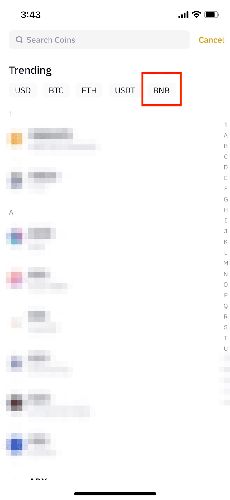
- Search for and select the token
- Select the network
- Copy the deposit address
Important Notes:
- Always retrieve the address fresh before each deposit — although the address usually stays the same, the exchange may change it
- If a MEMO/TAG is displayed, you must copy it as well
Depositing from MetaMask to an Exchange
Using USDT deposit to Binance as an example (BEP20 network):
- Get the USDT BEP20 deposit address from Binance
- Open MetaMask and make sure the network is switched to BSC (BNB Smart Chain)
- Find USDT in the token list and click "Send"
- Paste the Binance deposit address
- Enter the amount to deposit
- Confirm Gas fee and transaction details
- Click confirm to send
- Wait for transaction confirmation
Depositing from Trust Wallet to an Exchange
- Get the deposit address from the exchange
- Open Trust Wallet
- Find the token to deposit and tap "Send"
- Paste the exchange deposit address
- Enter the amount
- Confirm the network and fee
- Tap Send
How to Choose the Deposit Network?
Whatever network your wallet uses, select the same network for the deposit. A network mismatch may result in permanent asset loss.
Common matching relationships:
| Wallet Network | Exchange Deposit Network |
|---|---|
| Ethereum Mainnet | ERC20 |
| BNB Smart Chain | BEP20 (BSC) |
| Polygon | Polygon |
| Arbitrum One | Arbitrum |
| Tron | TRC20 |
| Solana | SOL |
If you are unsure which network your wallet is using, check the network name displayed at the top of the wallet.
How Much Gas Fee Does a Deposit Require?
Gas fees vary by network:
- ERC20 (Ethereum): Approximately $1–10, depending on network congestion
- BEP20 (BSC): Approximately $0.05–0.3
- TRC20 (TRON): Sending TRX is nearly free; token transfers cost a few TRX
- Polygon: Approximately $0.01–0.1
- Solana: Approximately $0.001–0.01
Make sure you have enough native tokens to pay Gas fees. If your MetaMask is sending USDT on the BSC network, you need BNB to pay for Gas.
Security Reminder
Depositing to an exchange also requires caution:
- Verify the deposit address: After pasting, always check multiple characters at the beginning and end of the address
- Confirm network match: The wallet network and the exchange deposit network must be identical
- Do a small test first: Send a small amount before your first deposit or any large deposit
- Do not forget MEMO/TAG: Some tokens (like XRP, EOS, ATOM) require a MEMO/TAG for deposits
- Wait for sufficient confirmations: Do not rush to trade — wait for the exchange to confirm the deposit
- Use official deposit addresses only: Only obtain deposit addresses from the exchange app or official website
Visit Binance to start secure trading, or download Binance App (Apple users refer to the iOS installation guide) for convenient mobile operations.
Does Depositing to an Exchange Have Fees?
Exchanges do not charge deposit fees, but you need to pay the on-chain Gas fee (charged by the blockchain network). Gas fees vary by network — BSC and Polygon have very low Gas fees.
How Long Does a Deposit Take to Arrive?
Deposit arrival time depends on the blockchain network confirmation speed and the number of confirmations required by the exchange. BEP20 typically takes a few minutes, ERC20 about 5–30 minutes, and BTC about 30–60 minutes. Exchanges usually display the deposit after a certain number of block confirmations.
What If the Deposit Shows Success but the Exchange Has Not Received It?
First confirm on the blockchain explorer that the transaction was successful. If it is confirmed on-chain but the exchange has not credited it, the exchange may be processing or may need more confirmations. If it still has not arrived after some time, contact exchange customer service and provide the transaction hash.
Can Someone Else Deposit Directly from Their Wallet to My Exchange Account?
Technically yes, as long as your exchange deposit address is used. However, some exchanges require that the depositing address owner matches the account holder (especially on exchanges with strict KYC), and deposits from third-party addresses may trigger risk control reviews.